


- 14 Jul, 2026
- 1 Comment
- 9 Mins Read

The Cloud Job Market Has a Specific Problem — and Beginners Are Part of the Solution
Here’s the counterintuitive truth about cloud careers in 2026: the problem isn’t that there aren’t enough senior cloud professionals. It’s that the pipeline producing those senior professionals has a broken feeding mechanism at the entry level.
Companies running AWS and Azure infrastructure need administrators. They need people who can deploy virtual machines, configure networking, manage identities, monitor costs, enforce security policies, and keep cloud environments running reliably. These are skills that can be taught systematically — they don’t require a decade of experience or a computer science degree. They require structured training, the right certifications, and hands-on practice.
The market data confirms the opportunity. The average Azure Cloud Administrator salary in Canada is $102,187 per year (Glassdoor Canada, 2025). Top earners report making up to $146,850 annually (90th percentile). Cloud administrator salaries are growing at 5–8% annually. The average pay of an Azure Administrator in Ontario reached $124,229 in 2025 according to ZipRecruiter. And AWS certifications have driven an average salary increase of 27% for professionals who pursue them (Jefferson Frank, cited by Coursera).
This blog is written specifically for beginners — professionals who are not yet in cloud careers but want to enter one through the dual-platform AWS and Azure Administrator Course that Canadian employers are hiring for.
Why Learn Both AWS and Azure — Not Just One Platform?
The most common question from prospective students: “Should I learn AWS or Azure? Why both?”
The honest answer is that the Canadian enterprise market doesn’t respect that binary.
AWS dominates global cloud market share at approximately 30%, with Azure at 20% (Statista, 2026). In the United States, many smaller companies run AWS exclusively. In Canadian enterprises — particularly in financial services, government, healthcare, and manufacturing — the picture is different.
Most large Canadian organizations are Microsoft-centric: they run Microsoft 365, Active Directory, Teams, and often Dynamics 365. Azure is the natural extension of that Microsoft ecosystem, making it the dominant choice for enterprise infrastructure. At the same time, many of those same organizations also use AWS for specific workloads — particularly where AWS services (like SageMaker, Redshift, or specific managed services) have no direct Azure equivalent.
The result: multi-cloud competency is the expectation in Canadian enterprise hiring, not a specialization. A cloud administrator who can manage Azure infrastructure for day-to-day operations AND support AWS workloads for specific applications is worth more than one who can only do either alone.
Additionally, having both the AZ-104 (Azure Administrator Associate) and the AWS Certified SysOps Administrator Associate on your resume effectively doubles the pool of roles you qualify for — a practical career strategy that costs training time but pays back substantially.
What the AWS and Azure Administrator Course Covers
A comprehensive AWS and Azure Administrator Course for beginners builds from foundational concepts to certification-ready competency across both platforms:
Foundation Module: Cloud Computing Fundamentals
Before platform specifics, beginners need the conceptual foundation:
- What cloud computing is: deployment models (public, private, hybrid, multi-cloud)
- Service models: IaaS (infrastructure), PaaS (platform), SaaS (software) — what each means and when each is used
- Core concepts: virtualization, elasticity, pay-as-you-go billing, shared responsibility model
- Networking basics: IP addressing, subnets, DNS, routing — the networking knowledge needed for cloud administration
- Operating systems: Linux command line basics, Windows Server administration fundamentals
- Scripting fundamentals: PowerShell for Azure, AWS CLI and bash for AWS
Azure Administration Track (AZ-104 Aligned)
Azure Governance and Subscriptions Azure subscription structure, management groups, resource groups. Role-Based Access Control (RBAC): assigning permissions at subscription, resource group, and resource levels. Azure Policy: enforcing organizational standards automatically. Resource tagging for cost allocation.
Azure Networking Virtual Networks (VNets) and subnets. Network Security Groups (NSGs): inbound and outbound security rules. Azure Load Balancer and Application Gateway. VPN Gateway: connecting on-premises networks to Azure. ExpressRoute overview. Azure DNS: public and private DNS zones. Azure Bastion for secure remote administration.
Azure Compute Virtual Machine deployment: sizes, images, availability sets and zones for high availability. Azure Virtual Machine Scale Sets for automatic scaling. Azure App Service for web application hosting. Azure Container Instances and introduction to Azure Kubernetes Service (AKS). Azure Batch for large-scale parallel workloads.
Azure Storage Azure Storage accounts: Blob, Queue, Table, File storage. Storage tiers: Hot, Cool, Archive. Azure File Sync for hybrid file sharing. Storage security: shared access signatures, encryption at rest, private endpoints.
Azure Active Directory and Identity Azure AD concepts: users, groups, service principals, managed identities. Multi-Factor Authentication (MFA) and Conditional Access. Azure AD B2B for guest users. Azure AD Connect for hybrid identity (synchronizing on-premises AD). Privileged Identity Management (PIM) overview.
Azure Monitor and Cost Management Azure Monitor: metrics, logs (Log Analytics workspaces), alerts, and action groups. Azure Backup: VM backup, file recovery. Azure Site Recovery for disaster recovery. Azure Cost Management: budgets, cost alerts, cost optimization recommendations.
AWS Administration Track (AWS SysOps Associate Aligned)
AWS Account Structure and IAM AWS Organizations for multi-account management. IAM: users, groups, roles, and policies. Permission boundaries and service control policies. AWS IAM Identity Center (SSO) for centralized access management.
AWS Compute EC2: instance types, purchasing options (on-demand, reserved, spot, savings plans). EC2 Auto Scaling: launch configurations, auto scaling groups, scaling policies. Elastic Load Balancing: Application, Network, and Gateway Load Balancers. AWS Lambda: serverless compute fundamentals.
AWS Networking VPC: subnets (public and private), route tables, internet gateways, NAT gateways. Security Groups and Network ACLs. VPC Peering and AWS Transit Gateway. AWS Direct Connect and Site-to-Site VPN. Route 53: DNS management and routing policies. CloudFront: CDN fundamentals.
AWS Storage S3: buckets, objects, versioning, lifecycle policies, storage classes (Standard, IA, Glacier). EBS: volume types, snapshots, encryption. EFS: managed NFS for Linux workloads. AWS Backup: centralized backup management.
AWS Database Services RDS: managed relational databases (MySQL, PostgreSQL, Aurora). DynamoDB: NoSQL at scale. ElastiCache: managed Redis and Memcached.
AWS Monitoring, Security, and Cost CloudWatch: metrics, logs, alarms, dashboards. CloudTrail: API activity logging for audit and compliance. AWS Config: resource compliance monitoring. AWS Security Hub: centralized security posture management. AWS Trusted Advisor: cost optimization, security, and performance recommendations. AWS Cost Explorer and Budgets.
Hands-On Labs and Real Scenarios
- Deploy a three-tier web application on Azure (VMs, Load Balancer, SQL Database)
- Deploy the same application architecture on AWS (EC2, ALB, RDS)
- Configure automated backup and disaster recovery for both environments
- Implement cost governance policies on Azure and AWS
- Set up centralized monitoring and alerting across both platforms
- Configure identity federation between Azure AD and AWS
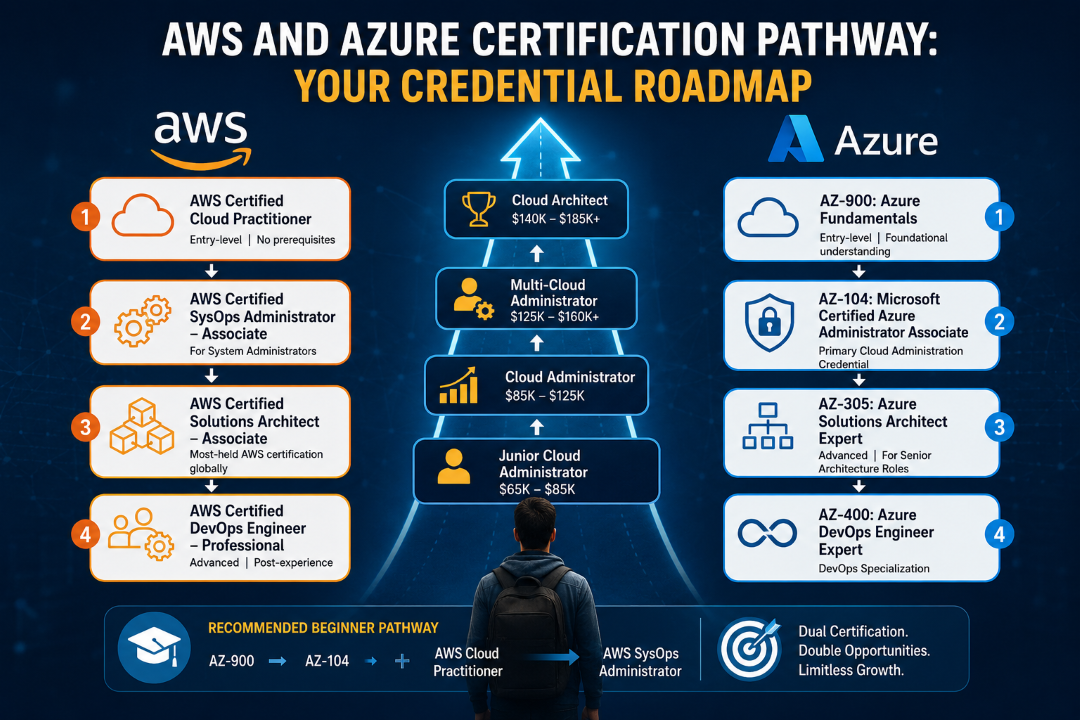
AWS and Azure Certification Pathway: Your Credential Roadmap
For AWS:
- AWS Certified Cloud Practitioner (entry-level, no prerequisites) — opens cloud understanding
- AWS Certified SysOps Administrator – Associate — the target for system administrators
- AWS Certified Solutions Architect – Associate — the most-held AWS certification globally (salary: ~$113,261/year average)
- AWS Certified DevOps Engineer – Professional (advanced, post-experience) — salary: ~$142,000/year average
For Azure:
- AZ-900: Azure Fundamentals (entry-level) — foundational understanding
- AZ-104: Microsoft Certified Azure Administrator Associate — the primary cloud administration credential
- AZ-305: Azure Solutions Architect Expert (advanced) — for senior architecture roles
- AZ-400: Azure DevOps Engineer Expert — DevOps specialization
The recommended beginner pathway: AZ-900 → AZ-104 on Azure simultaneously with AWS Cloud Practitioner → AWS SysOps Administrator on AWS. This dual-certification profile positions you for both the Microsoft-centric enterprise market and AWS-focused opportunities.
Salary Data: What AWS and Azure Administrators Earn in Canada (2026)
| Level | Role | Salary Range (CAD/year) |
|---|---|---|
| Entry | Junior Cloud Administrator | $65,000 – $85,000 |
| Mid | Azure Cloud Administrator | $85,000 – $125,000 |
| Mid | AWS SysOps Administrator | $90,000 – $130,000 |
| Senior | Multi-Cloud Administrator | $125,000 – $160,000+ |
| Senior | Cloud Architect | $140,000 – $185,000+ |
| Contract | Cloud Administrator (Ontario) | $55–$95/hour |
Azure Cloud Administrators in Canada average $102,187/year (Glassdoor Canada). The ZipRecruiter Ontario average for SAP Basis roles (which overlap with cloud administration) reaches $127,856/year. Cloud administrator salaries are growing at 5–8% annually with no slowdown expected through 2030.
Why IIBS College for AWS and Azure Training in Canada
IIBS College’s AWS and Azure Administrator Course is specifically designed for beginners entering the cloud market:
Beginner-Inclusive Design: The course builds from cloud fundamentals, networking basics, and operating system concepts before advancing to platform-specific administration. No prior cloud experience required.
Dual-Platform Coverage: Both Azure and AWS are covered comprehensively — not one platform with a brief introduction to the other.
Certification Exam Alignment: Training maps to AZ-900, AZ-104 (Azure), AWS Cloud Practitioner, and AWS SysOps Administrator exam objectives.
Hands-On Lab Environment: Students work in real Azure and AWS environments — deploying resources, configuring services, monitoring systems, and managing costs in actual cloud platforms.
Online Course Availability: The AWS and Azure Online Course at IIBS delivers instructor-led training with full lab access, accessible to learners across Canada.
Career Support: Resume building, LinkedIn optimization, and interview preparation for cloud administrator roles.
Registered Under Ontario Career Colleges Act, 2005.
👉 Explore the AWS and Azure Training at IIBS →
Frequently Asked Questions (FAQ)
Q1: Can I get a cloud job in Canada without a computer science degree? Yes. Cloud administration is one of the IT fields where certifications and demonstrated hands-on skills often carry more weight than formal degrees. Many cloud administrators have built careers through certification study and practical experience without traditional CS education.
Q2: How long does the AWS and Azure Administrator Course take for beginners? Most comprehensive programs run 3 to 4 months for beginners, covering foundations through both platform-specific tracks with exam preparation.
Q3: What is the difference between a Cloud Administrator and a Cloud DevOps Engineer? A Cloud Administrator focuses on managing, maintaining, and monitoring existing cloud infrastructure. A Cloud DevOps Engineer automates the deployment and operation of applications and infrastructure using CI/CD pipelines, IaC (Terraform, Ansible), and automation tools. Administrators typically transition into DevOps roles with additional training and experience.
Q4: Is the AWS and Azure Online Course at IIBS live or recorded? Live, instructor-led sessions with interactive labs and Q&A. Recordings are available for review.
Q5: Which certification should I pursue first — Azure or AWS? For candidates in Microsoft-heavy environments (most large Canadian enterprises), AZ-104 is often the more immediately applicable starting point. For those in more AWS-focused environments or with Linux/open-source backgrounds, AWS Cloud Practitioner → SysOps is the more natural path. The dual-platform course prepares you for both.
Q6: Do cloud administrators work remotely in Canada? Many cloud administrator roles in Canada offer remote or hybrid work arrangements, making this one of the IT careers with the greatest geographic flexibility.
Q7: What skills complement cloud administration for career advancement? DevOps and infrastructure as code (Terraform), Kubernetes and container orchestration, cloud security (CSPM, identity management), FinOps (cloud cost optimization), and scripting (Python, PowerShell) are the most commonly recommended complementary skills.
The Cloud Is Where Canadian IT Careers Are Going. Start Where You Are.
You don’t need a computer science degree, a decade of IT experience, or an existing cloud job to build a cloud career. You need structured training, the right certifications, hands-on practice, and the right career support.
IIBS College’s AWS and Azure Training in Canada is built for exactly the beginner profile — providing everything needed to move from zero cloud experience to a certified, job-ready cloud administrator.
🔵 Enroll in the AWS and Azure Administrator Course at IIBS → 📞 Talk to an Advisor — Discuss your current IT background and the fastest path to cloud certification.
AZ-104. AWS SysOps. A six-figure cloud career. Start with IIBS.
Cloud Computing Skills Employers Want in Ontario 2026
[…] IIBS also discusses the beginning of this career pathway in its guide, The Cloud Job Market Has a Specific Problem — and Beginners Are Part of the Solution. […]